How this site works
Intro
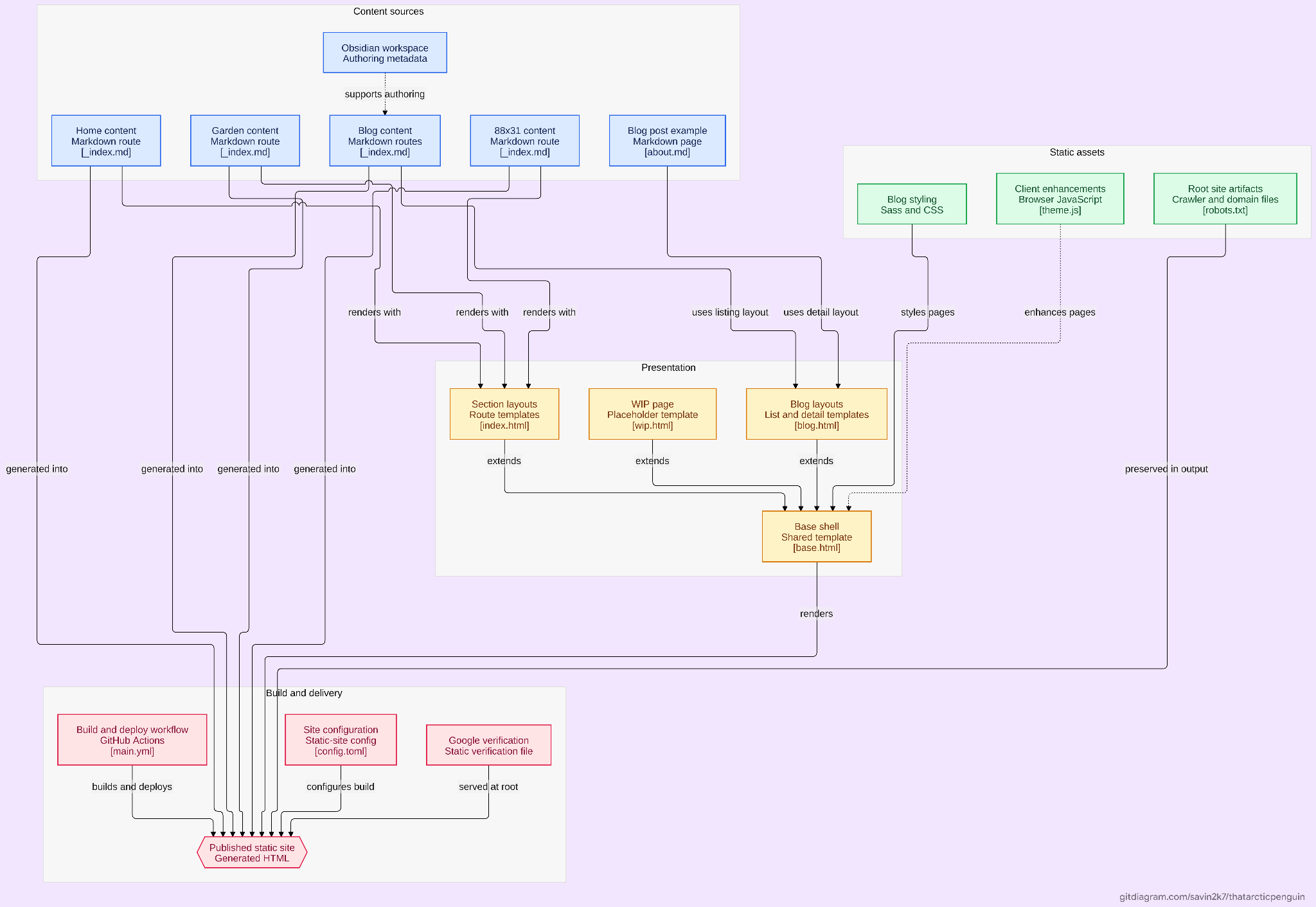
I've been building this site for about a year and in that time, I've redesigned it twice, changed a bunch of things. The stack itself is pretty simple, and honestly, pretty common for static weblogs. Zola, Tera, JavaScript and SCSS. It's a static site, and I don't really see anything to change about that anytime soon. All I'm doing is writing things and showing them to people.
How blogs work
In the early versions of the site, I used to write my blogs in plain HTML (yes). Sometime later I switched to Markdown, and for a while I had a small Python script that converted my Markdown into the HTML structure I used on the site. It mostly handled things like headings, paragraphs, the title and a few other small bits.
For this version of the site, I switched to a rusty static-site generator, Zola. Zola basically takes my Markdown files, templates and assets, processes all of them during build time, and gives me the actual site at the end. So instead of manually converting every post, I can just write a Markdown file and let the templates deal with the rest. I can keep the different parts of the site separate without redundancy.
Transitions
If you haven't already, try the theme transition on this page.
It's a really small and slightly cheesy addition to the site, and probably one of the only creative parts around here ;-;.
The transition uses the View Transition API, with an animated GIF being used as a CSS mask. When the theme button is clicked, JavaScript prepares the mask GIF and assigns it to --current-mask-gif.
The browser then takes a snapshot of the old page, runs setTheme(), and gets the new page state. The new page is placed behind the GIF mask, and the mask itself is animated using CSS. It expands, plays through the animation, and then grows enough to reveal the entire page.
Top 10 unnecessary ways of changing a theme.
How the Garden works
The Garden is basically a collection of posters and ratings for movies, TV shows and anime that I like. The idea was a product of inspiration from multiple similar media pages on other people's sites.
Originally, the Garden was literally just a bunch of posters sitting next to each other with rating. Sometime later, I added the threshold effect for the posters, which was something I'd seen on another site and really liked.
The first version of it ran client-side. JavaScript would take the poster, draw it onto a transparent canvas, go through the pixels, check their brightness against a threshold, and turn the darker pixels into the blue colour used by the site. However, running it client side was a bit slow.
So now the thresholding happens during build time using Pillow. The processed PNGs are generated beforehand and the browser just loads those. The original JavaScript canvas implementation is still kept as a fallback.
The posters are also lazy loaded, so we're not making the browser download and process everything at once.
Guestbook
The Guestbook is probably the least complicated part of the site since I didn't have to build it from scratch, it's just a third-party integration.
HTMLCommentBox handles the actual comments, posting, likes and all the persistent stuff. Once HCB loads, a small bit of JavaScript cleans up some of its default UI. It hides stuff like the image upload controls, RSS, among other stuff that don't really fit the rest of the site.
Conclusion
And that's a wrap.
It's a pretty small static-site stack, and I'm fairly sure it's all the site is ever going to need. Most of the things here aren't especially complicated on their own. They're just things I thought would be a cool addition.
Now it mostly just comes down to populating the site with more stuff.
See you then.